U-Build Website
U-Build Website
U-Build Website
Build your app easily
Build your app easily
Build your app easily
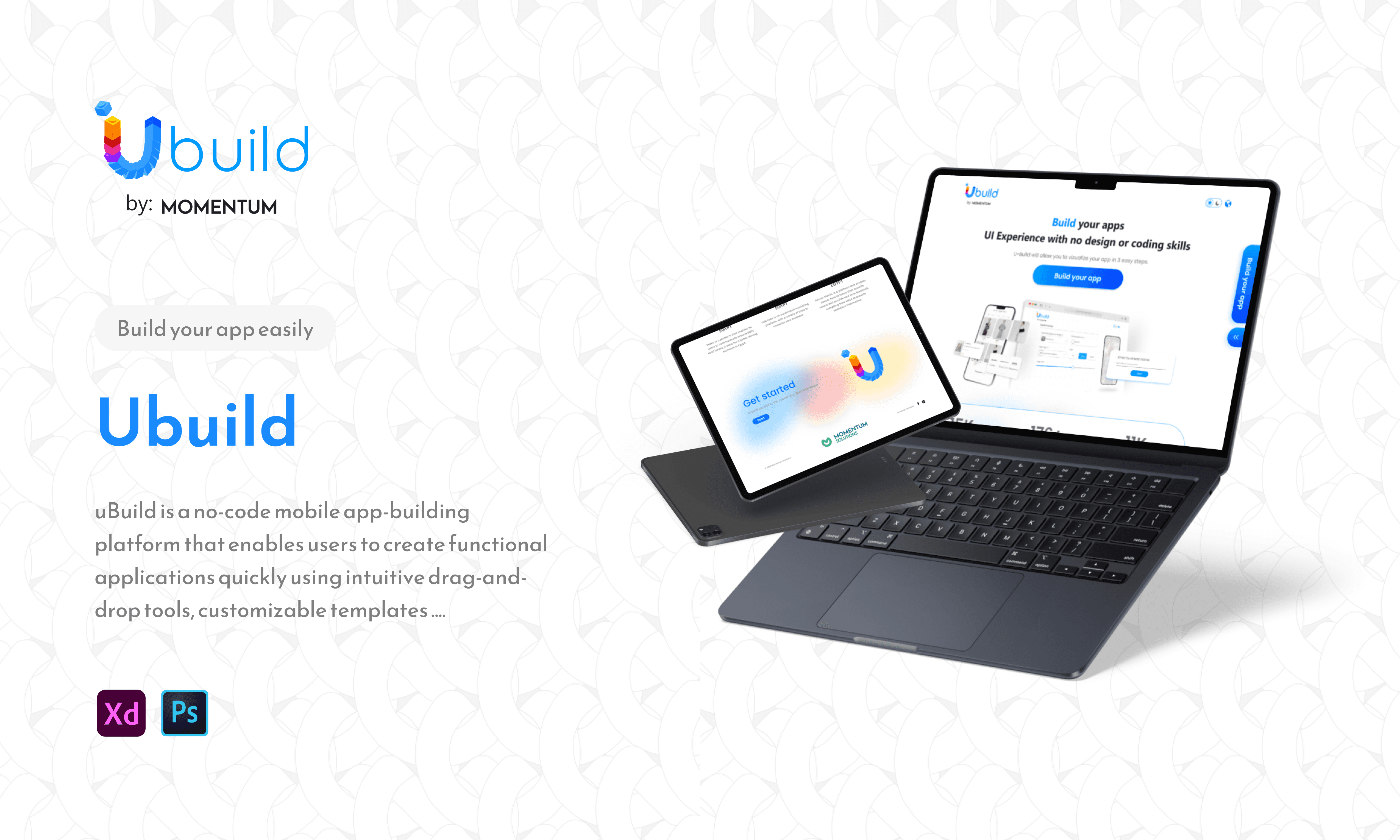
uBuild is a no-code mobile app-building platform that enables users to create functional applications quickly using intuitive drag-and-drop tools, customizable templates, and real-time previews. It simplifies the development process with guided steps, smart defaults, and visual customization options, helping users publish apps efficiently—without any technical or coding experience.
uBuild is a no-code mobile app-building platform that enables users to create functional applications quickly using intuitive drag-and-drop tools, customizable templates, and real-time previews. It simplifies the development process with guided steps, smart defaults, and visual customization options, helping users publish apps efficiently—without any technical or coding experience.
Category
Technology
Technology
Location
Egypt
Egypt
Year:
2023
2023
Client:
MSOL
MSOL
Project Overview
Project Overview
uBuild was designed to make mobile app creation accessible to anyone by replacing complex development workflows with intuitive, visual tools. The platform allows users to assemble screens, customize UI elements, and structure app functionality through drag-and-drop components and ready-made templates. Real-time previews ensure that users see their progress instantly, reducing uncertainty and accelerating decision-making. The project focused on simplifying onboarding, clarifying feature choices, and guiding users through a smooth publishing process. My role involved defining the information architecture, interaction patterns, and visual system that support an effortless, empowering no-code app-building experience
uBuild was designed to make mobile app creation accessible to anyone by replacing complex development workflows with intuitive, visual tools. The platform allows users to assemble screens, customize UI elements, and structure app functionality through drag-and-drop components and ready-made templates. Real-time previews ensure that users see their progress instantly, reducing uncertainty and accelerating decision-making. The project focused on simplifying onboarding, clarifying feature choices, and guiding users through a smooth publishing process. My role involved defining the information architecture, interaction patterns, and visual system that support an effortless, empowering no-code app-building experience
Our Approach
Our Approach
Our approach centered on understanding how non-technical users think about app building, where they struggle, and what guidance they need to feel confident. We conducted interviews, analyzed competing no-code tools, and mapped the ideal creation flow—from onboarding to customization to publishing. Based on these insights, we built a framework of guided steps, modular UI components, and templates that reduce cognitive load while enabling flexibility. Iterative prototyping helped refine navigation, editing interactions, and preview behavior. My responsibilities included shaping the UX strategy, designing core component libraries, and ensuring every step in the creation process felt approachable and intuitive.
Our approach centered on understanding how non-technical users think about app building, where they struggle, and what guidance they need to feel confident. We conducted interviews, analyzed competing no-code tools, and mapped the ideal creation flow—from onboarding to customization to publishing. Based on these insights, we built a framework of guided steps, modular UI components, and templates that reduce cognitive load while enabling flexibility. Iterative prototyping helped refine navigation, editing interactions, and preview behavior. My responsibilities included shaping the UX strategy, designing core component libraries, and ensuring every step in the creation process felt approachable and intuitive.
Key Challenges & Solutions
Key Challenges & Solutions
One of the biggest challenges was simplifying inherently complex app-building tasks without limiting user creativity. We addressed this by designing a drag-and-drop canvas with intelligent snapping, contextual menus, and preconfigured components that adapt to user choices. Another challenge involved guiding first-time users through unfamiliar terminology and workflows. Clear onboarding, inline tips, and structured templates solved this. Ensuring seamless real-time previews required optimizing interactions and maintaining visual accuracy across editing states. These solutions created a tool that feels powerful yet easy to learn, providing users with confidence throughout the app creation process.
One of the biggest challenges was simplifying inherently complex app-building tasks without limiting user creativity. We addressed this by designing a drag-and-drop canvas with intelligent snapping, contextual menus, and preconfigured components that adapt to user choices. Another challenge involved guiding first-time users through unfamiliar terminology and workflows. Clear onboarding, inline tips, and structured templates solved this. Ensuring seamless real-time previews required optimizing interactions and maintaining visual accuracy across editing states. These solutions created a tool that feels powerful yet easy to learn, providing users with confidence throughout the app creation process.
Target Users & Use Cases
Target Users & Use Cases
uBuild serves entrepreneurs, small business owners, content creators, and individuals seeking to build mobile apps without programming knowledge. Core use cases include assembling screens using drag-and-drop components, selecting and customizing templates, adjusting branding, previewing app behavior in real time, and publishing directly to app stores. Additional scenarios involve testing layouts, creating prototypes for stakeholders, experimenting with features, and updating existing apps through simple edits. The platform empowers users to move from idea to functional product quickly while maintaining creative freedom and ensuring a smooth, guided building experience.
uBuild serves entrepreneurs, small business owners, content creators, and individuals seeking to build mobile apps without programming knowledge. Core use cases include assembling screens using drag-and-drop components, selecting and customizing templates, adjusting branding, previewing app behavior in real time, and publishing directly to app stores. Additional scenarios involve testing layouts, creating prototypes for stakeholders, experimenting with features, and updating existing apps through simple edits. The platform empowers users to move from idea to functional product quickly while maintaining creative freedom and ensuring a smooth, guided building experience.
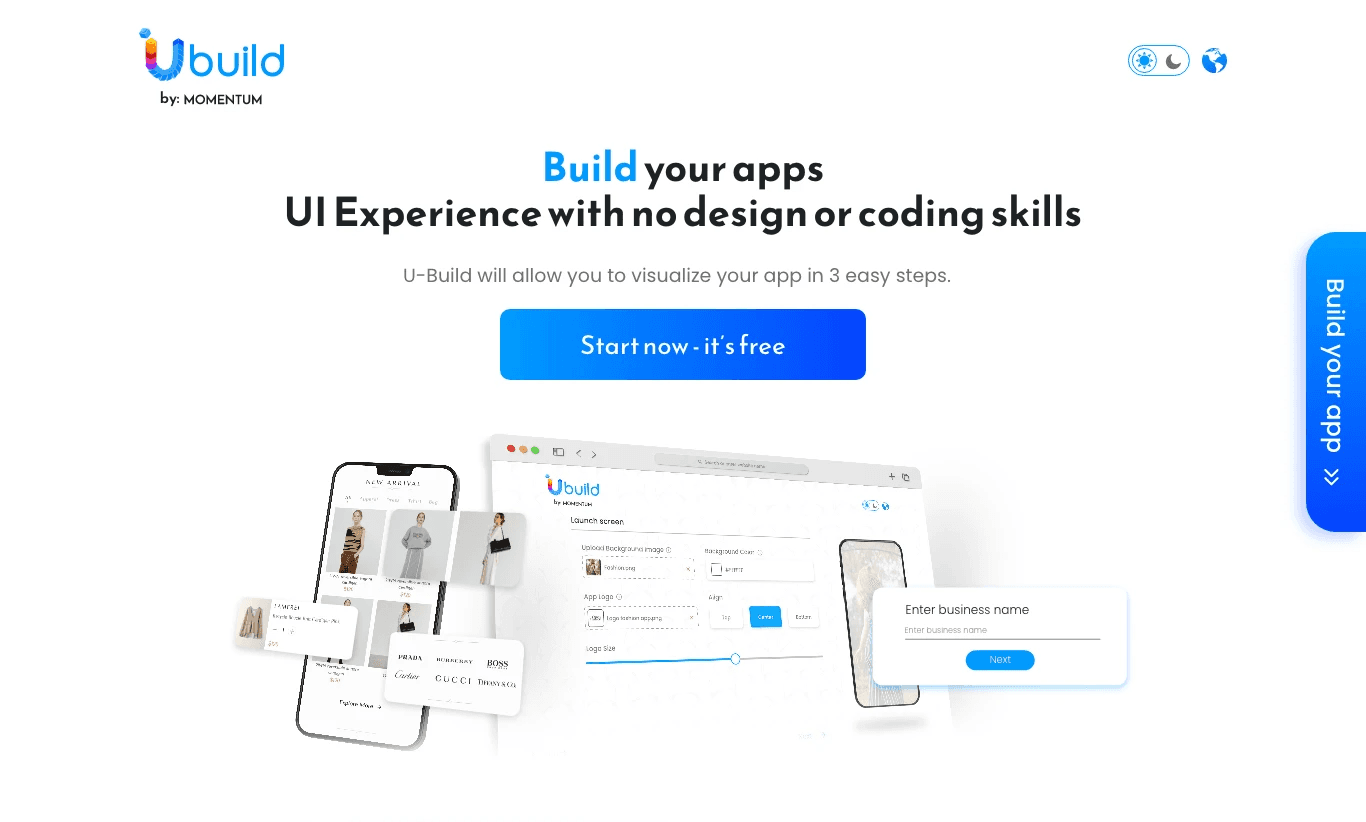
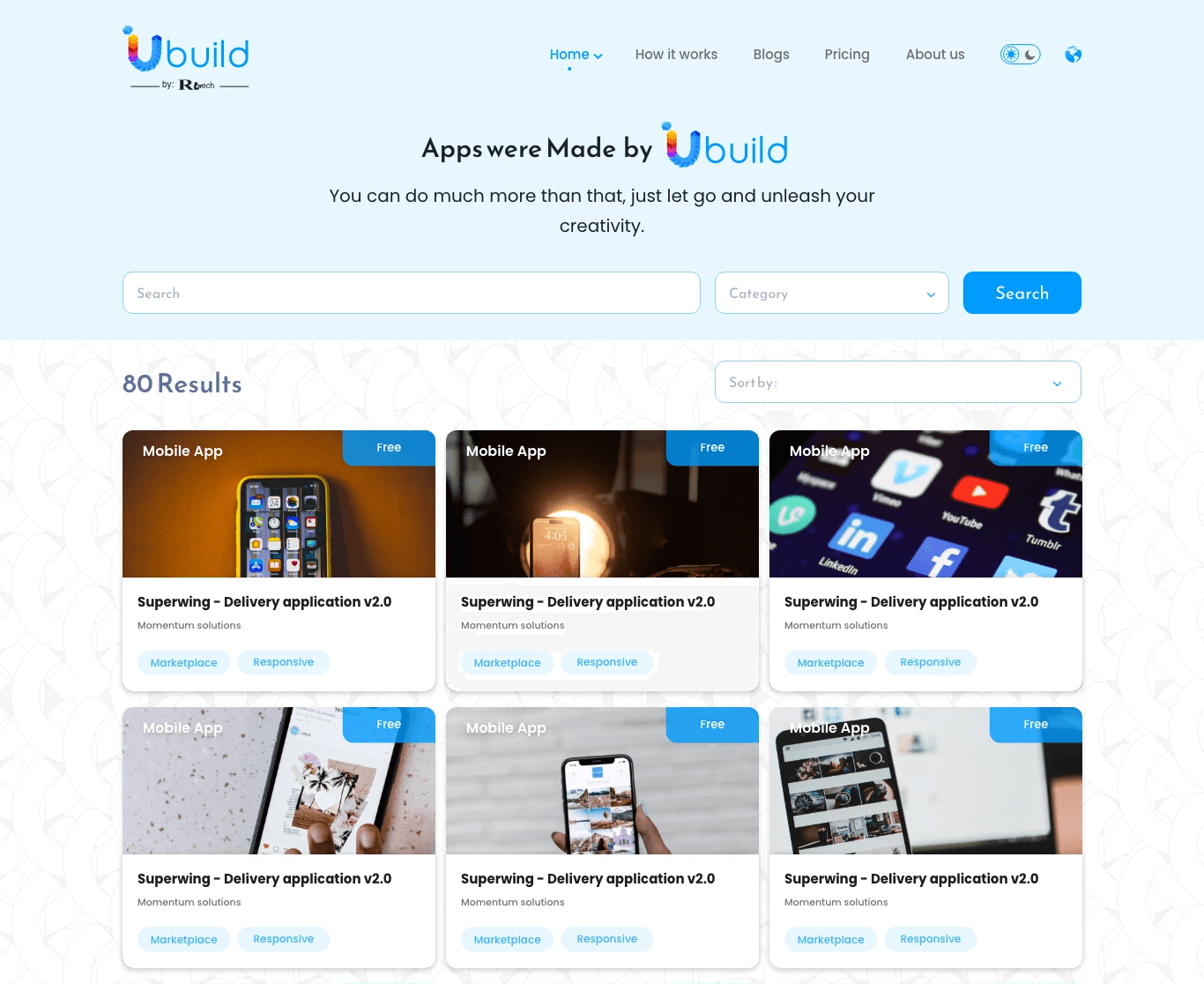
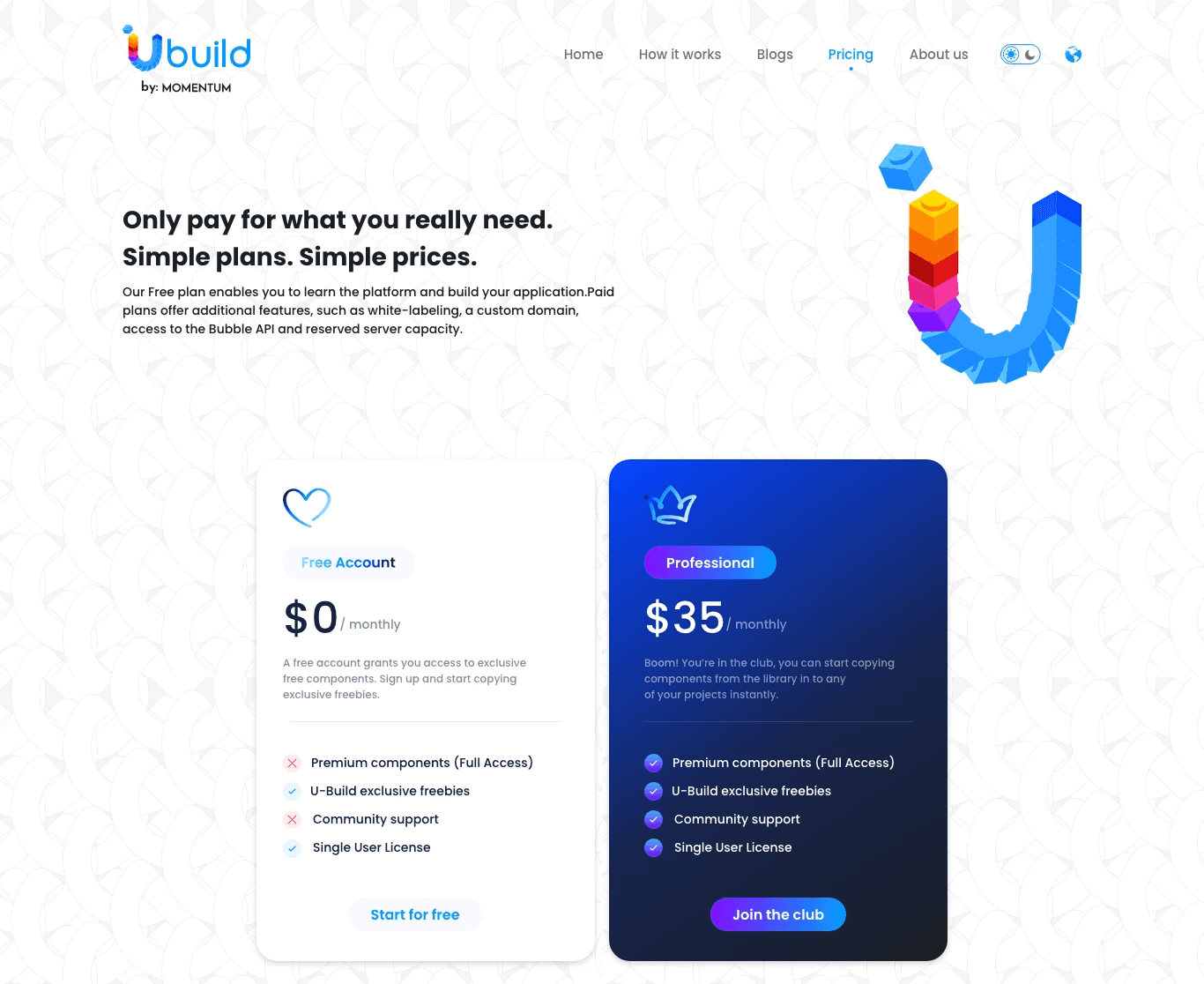
Screens From Project
Screens From Project
Screens From Project
We turn bold ideas into working technology.
With full control over design, development, and deployment, we deliver solutions that perform in the real world and scale with purpose.
We turn bold ideas into working technology.
With full control over design, development, and deployment, we deliver solutions that perform in the real world and scale with purpose.
We turn bold ideas into working technology.
With full control over design, development, and deployment, we deliver solutions that perform in the real world and scale with purpose.